
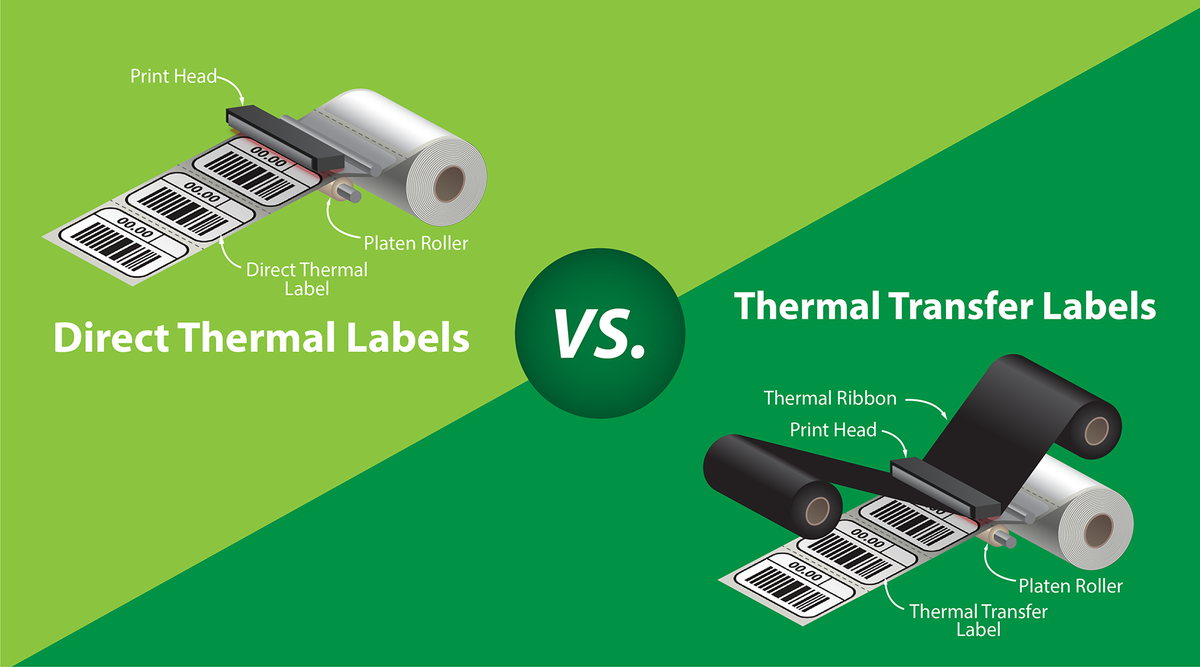
Direct thermal vs thermal transfer, in one line: direct thermal labels are heat-sensitive and print with no ribbon. Thermal transfer labels need a ribbon that melts ink onto the label. Direct thermal costs less and is simpler to run, which is why most shipping labels are direct thermal. Thermal transfer lasts longer, so it's the better fit for labels that have to survive years, sunlight or harsh conditions.
This guide covers how each method works, where each one is the right choice, and how to check which one your printer uses. It's written by Ecotherm, which makes direct thermal labels only.
What are direct thermal labels?
A direct thermal label has a heat-sensitive coating on its face stock. The printer's thermal printhead heats tiny dots on the label, and the coating darkens where it's heated. That forms the text, barcodes and graphics. Nothing goes between the printhead and the label: no ribbon, no ink and no toner.
That's why direct thermal is the default for shipping labels. USPS, UPS, FedEx, Amazon, eBay, Etsy and Shopify Shipping all output 4" x 6" labels that print cleanly on a direct thermal printer.
What are thermal transfer labels?
A thermal transfer printer uses a ribbon coated with wax, wax-resin or resin. The printhead heats the ribbon, and the melted ink bonds to the label's surface. The label itself isn't heat-sensitive. Because the image sits on top as ink, it holds up longer against heat, light, abrasion and chemicals. Thermal transfer can also print on synthetic materials such as polyester and polypropylene.
Direct thermal vs thermal transfer: side-by-side
| Direct thermal | Thermal transfer | |
|---|---|---|
| Ribbon needed | No | Yes |
| Supplies to buy | Labels only | Labels and ribbons, matched to each other |
| Printer setup | Load the roll and print | Load the roll, load the ribbon, then match the ribbon width and type |
| Image life | Shorter. Fades with heat, sunlight and time | Longer. Built for years of service |
| Best for | Shipping labels, packing slips, receipts, short-term barcodes, inventory and warehouse labels | Asset tags, outdoor labels, long-term product ID and chemical-resistant labels |
| Materials | Mostly paper | Paper and synthetics |
When direct thermal is the better choice
- Shipping and fulfillment. A shipping label only has to last until the package is delivered and scanned. Direct thermal handles that at the lowest cost per label.
- High volume. Without a ribbon you never have to change one mid-shift or match ribbon widths to label sizes. You also don't throw out used ribbon cores.
- Simple setup. Shipping software from the major carriers and marketplaces prints straight to direct thermal printers. You load a roll, set the label size and calibrate.
- Short-life barcodes. Warehouse picking, work-in-progress tags, inventory labels and temporary product labels usually come off long before fading would matter.
When thermal transfer is the better choice
Choose thermal transfer if the label needs to stay readable for years, or if it will sit in direct sunlight, high heat, or contact with chemicals or abrasion. Typical examples are equipment asset tags, outdoor labels and permanent product identification. Ecotherm doesn't make thermal transfer labels, and its direct thermal labels aren't designed for thermal transfer printers.
How long do direct thermal labels last?
Printed direct thermal labels darken or fade when they're exposed to heat, direct sunlight, and some oils and solvents. To keep printed labels readable as long as possible, store them out of sunlight and away from heat sources. Unused rolls also have a shelf life. Ecotherm rates its white direct thermal labels for 1 year stored at 73°F (23°C) and 50% relative humidity, so buy the quantity you'll use within that window.
Once applied, Ecotherm labels perform from 5°F to 149°F (−15°C to 65°C). Apply them at 50°F (10°C) or warmer so the adhesive bonds properly.
Does my printer use direct thermal or thermal transfer?
- No ribbon compartment or ribbon spindles: it's a direct thermal printer. Most dedicated shipping label printers, including Rollo, MUNBYN and Zebra "d" models such as the ZD421d, work this way.
- Ribbon spindles inside the cover: it can print thermal transfer. Check its settings or manual to see whether it can also run in direct thermal mode.
- Still not sure? Look up your model on our Thermal Label Printer Compatibility page. It lists the desktop and mobile printers that have been checked against Ecotherm labels for core size, print method and roll fit.
Direct thermal labels from Ecotherm
Ecotherm makes direct thermal labels in 30+ sizes. Desktop labels come on 1" core rolls, and a mobile range comes on 0.75" core rolls.
- 4" x 6" direct thermal shipping labels (ECOTHERM14129-4, 4" x 6"), the standard size for USPS, UPS, FedEx and marketplace labels
- Labels for 4" wide desktop printers
- Labels for 2.25" wide desktop printers
- Labels for mobile printers (0.75" core)
- All direct thermal label sizes
The white labels use 75gsm direct thermal face stock with a Permanent Hot Melt adhesive. They're BPA-free and BPS-free, tested by SGS (what BPA-free means). Free shipping from Amazon's US fulfillment centers.
Frequently asked questions
Can I use direct thermal labels in a thermal transfer printer?
Only if the printer has a direct thermal mode and you run it with the ribbon removed. Ecotherm labels are made for direct thermal printing. Don't use them in printers that only print thermal transfer.
Do direct thermal labels need ink or a ribbon?
No. The printhead's heat creates the image on the label's coating. You only buy labels.
Are direct thermal labels good for shipping?
Yes. They're the most common choice for shipping labels because a shipping label only needs to last until the package is delivered, and direct thermal has the lowest running cost.
Which is cheaper, direct thermal or thermal transfer?
Direct thermal is usually cheaper to run because there's no ribbon to buy. Thermal transfer costs more per label but lasts longer.
How can I tell if a label is direct thermal?
Quickly scratch the face of the label with a fingernail. A direct thermal label leaves a dark mark because the friction heats the coating. A thermal transfer label won't mark.